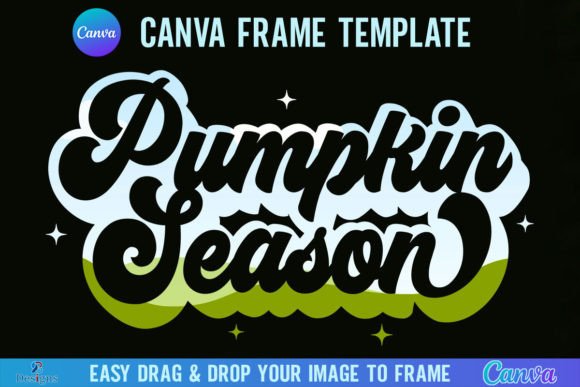
Autumn Visuals: The Pumpkin Season Canva Frame Template
When the air gets crisp and the leaves start to turn, the pressure mounts for designers and content creators to pivot their visual strategies. You need warm tones, rustic textures, and festive overlays, but commissioning custom artwork for every seasonal campaign isn't scalable. That is exactly why I started looking into the Pumpkin Season Canva Frame Template. It is a specialized design asset intended to bridge the gap between high-quality graphic design and the speed required for modern digital marketing.
Unpacking the Asset: What Exactly Is This Template?
At its core, this is a digital product designed to give you a structured layout for your autumn imagery. You will receive one zip file that needs to be unzipped to access the contents. Inside, there is a single PDF file containing a direct link to the Canva editor. Once you click that link, you gain access to the actual frame templates. The package is efficient—it contains two specific versions: Grouped and Ungrouped. This distinction is vital for your workflow. The "Grouped" version keeps the design elements locked together, which is perfect if you just want to drop a photo in and go. The "Ungrouped" version gives you the freedom to move individual design elements around, change colors, or adjust the composition to fit a specific brand identity.
The canvas size is set at 4000x4000 pixels. This is a massive resolution, making it ideal for high-definition screens, large-format printing, or ensuring that your social media graphics remain crisp even when cropped. The primary function of this asset is to act as a mask. You can easily drag and drop any PNG or JPG background image into the frame to fill the shape. It effectively acts as a premium font for your photos—giving structure and personality to a standard image.
The Visual Personality: Rustic Charm Meets Modern Functionality
Visually, the Pumpkin Season Canva Frame Template leans heavily into the rustic, harvest aesthetic. Think of the visual language of a cozy farmhouse or a high-end farmers market. The appeal lies in its ability to instantly evoke a specific mood without requiring you to build complex vector shapes from scratch. It carries the weight of seasonal nostalgia.
In terms of style, it acts similarly to a display font or a handwritten font—it is meant to grab attention immediately. While it isn't a typeface in the traditional sense, its role in your design hierarchy is identical to that of a script font. It provides the "flavor" and the emotional hook. If you are working on a project that requires a modern typography layout but with a seasonal twist, this template offers that structure. It balances the organic feel of autumn with the clean edges required for professional web design and editorial design.
Strategic Applications for Creators and Businesses
For the entrepreneur or small business owner, time is the most valuable currency. This template solves the "blank canvas" problem. Here is how I would apply this across different mediums:
- Social Media Marketing: Instagram and Pinterest thrive on seasonal content. Using this frame allows you to create a cohesive "look" for your stories and posts. It ensures your content feels timely and relevant, which boosts audience engagement.
- Logo Design and Branding: If you are a café, a boutique, or a lifestyle brand, you might use this frame as a temporary seasonal badge or sticker on your existing logo design. It signals to your customers that you are active and celebrating the season.
- Packaging Design: For crafters selling on Etsy or at local markets, this template is a lifesaver. You can use it to create labels for jams, candles, or baked goods. The high resolution ensures that the packaging design looks professional and print-ready.
- Digital Publishing: Bloggers and publishers can use this to frame featured images on their websites. It breaks up the monotony of standard rectangular photos and adds a thematic element to your editorial design without slowing down your site speed (since the final export is a flat image).
Technical Workflow and Customization
One of the strongest points of this asset is its compatibility with the most accessible design tool on the market. However, there is a critical technical requirement to note: You will need a FREE Canva account to open and edit the template. This lowers the barrier to entry significantly. You do not need expensive software like Adobe Illustrator to use it.
However, there is a caveat regarding output formats. If your goal is to download the design with a transparent background—for example, to place the pumpkin frame over a complex background in a different software—you must have a Canva Pro version or higher. The free version of Canva does not support transparent PNG exports. For those doing basic web design or standard social posts, the free version is sufficient as you can simply choose a background color in Canva before downloading.
The drag-and-drop mechanic is intuitive. It mimics how you would handle font pairing—you are essentially pairing your photography with this graphical frame. The "Ungrouped" version is particularly useful here. If the default color of the pumpkin or the leaves doesn't match your specific color palette, you can ungroup the elements and modify them. This level of control is what separates amateur design from professional creative font and asset usage.
Limitations and Compatibility Checks
It is equally important to understand what this product is not. The description explicitly states: "This is a digital product, no physical frames will be shipped to you." It is a digital file.
Furthermore, "It is not an SVG and not suitable for use with Cricut Design Space or Silhouette cutting machines." This is a crucial distinction for crafters and hobbyists. If you are looking to cut physical pumpkin shapes out of vinyl or paper for physical crafts, this file will not work. It is designed strictly for digital composition and print-on-demand design assets. It is a raster-based workflow, not a vector-cutting workflow.
Evaluating Fit for Your Project
When deciding if the Pumpkin Season Canva Frame Template fits your project, consider your need for speed and consistency. If you are a content creator who needs to produce 20 pieces of content for October, this template acts as a unifying element. It creates visual consistency across your feed, which strengthens brand perception.
Think of this template like a serif font in a newspaper—it provides the structure and the expected aesthetic. By using this frame, you are tapping into a shared cultural visual language (the harvest season) that your audience already understands. It reduces the cognitive load for your viewer; they see the pumpkin shape and immediately understand the context of your message.
In summary, this is a practical, utility-driven asset for the autumn season. It removes the friction of creating thematic graphics from scratch, allowing you to focus on the message and the photography itself. Whether you are a marketer planning a campaign or a designer looking for quick mockups, it serves as a reliable tool in your modern typography and graphic kit.